CodeWhale Review 2026: DeepSeek TUI Rebrand, CLI Workflow, Pricing, and Alternatives
TL;DR
Use this article to move into a better next click
- A practical CodeWhale review for developers searching for DeepSeek TUI: what changed in the rebrand, how the terminal agent works, what is free, where the risks are, and which alternatives to compare.
- CodeWhale is most relevant for CLI Tools + Agentic Coding, and the directory profile adds pricing, tradeoffs, and alternatives.
- Before you commit, compare it with Claude Code and OpenAI Codex.
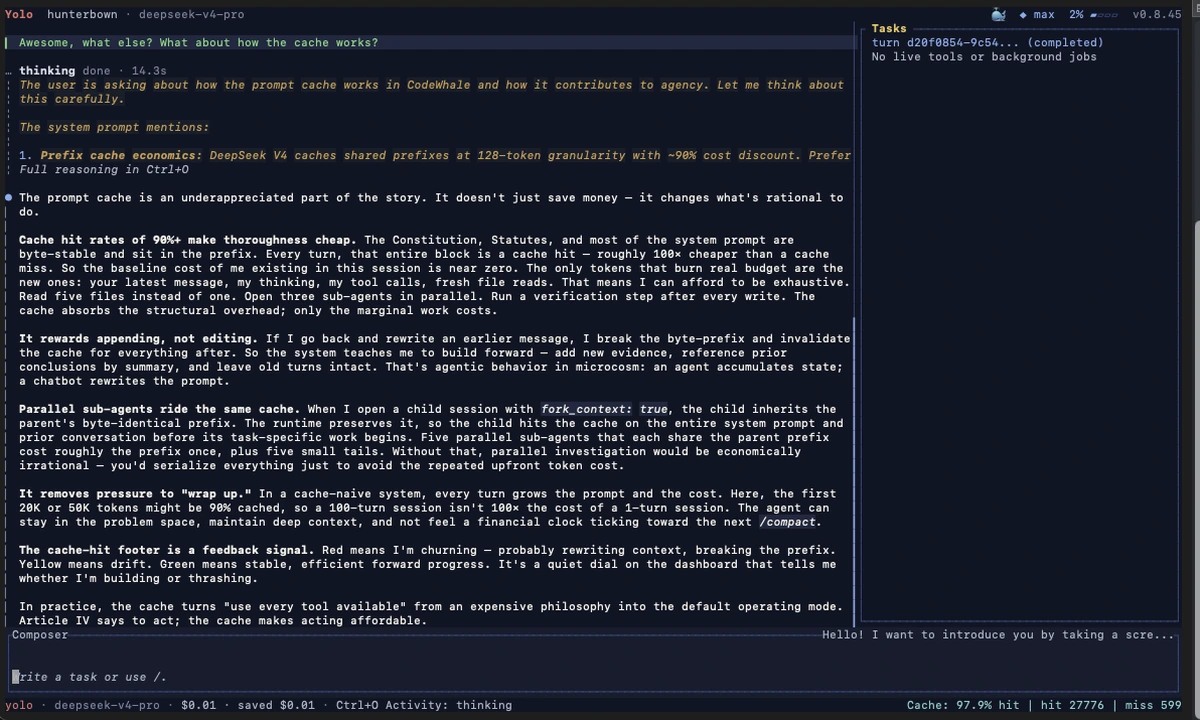
CodeWhale is the current name for the project many developers still search for as DeepSeek TUI. That matters because the old name is no longer just a harmless alias. The active npm package, release assets, CLI command, docs, and website now point users toward codewhale, while the legacy deepseek-tui package is deprecated.
Short answer: CodeWhale is worth evaluating if you want a local, open-source terminal coding agent with DeepSeek-first roots, broader provider routing, approval controls, MCP support, headless execution, and active public releases. It is not the safest default if you want a mature managed IDE, enterprise admin controls, or a workflow that avoids terminal permissions entirely.
Quick Verdict
| Question | CodeWhale answer |
|---|---|
| Best for | Terminal-first developers who want a local coding agent around DeepSeek, open-weight models, or compatible providers |
| Not ideal for | Teams that need a hosted IDE, centralized admin policy, or low-touch onboarding |
| Official site | codewhale.net |
| GitHub | Hmbown/CodeWhale |
| npm package | codewhale |
| Legacy package | deepseek-tui, now deprecated in favor of codewhale |
| License | MIT on the public GitHub repository |
| Current version checked | v0.8.66 on GitHub Releases and npm when checked on July 3, 2026 |
| Public signal checked | 39.3k+ GitHub stars and 3.3k+ forks when checked on July 3, 2026 |
| Pricing | Free open source; model provider, API, local GPU, and infrastructure costs are separate |
| Closest alternatives | Claude Code, OpenAI Codex, Gemini CLI, Aider, OpenCode, Reasonix |
Keep the tool in view
Open CodeWhale before you forget it
The profile page adds pricing, pros, cons, and internal alternatives without throwing you straight to a vendor pitch.
What Is CodeWhale?
CodeWhale is a terminal coding agent. You run it from a project, point it at a model provider, and use it to inspect files, edit code, run shell commands, plan multi-step work, and check results.
The product began as DeepSeek TUI, but the project has moved beyond a single-model identity. The official README says DeepSeek and open-weight models are first-class, while providers such as Anthropic, OpenAI-compatible routes, Kimi, GLM, OpenRouter, Fireworks, Ollama, vLLM, and SGLang can also sit behind the same runtime.
That makes CodeWhale different from a simple DeepSeek chat wrapper. It is closer to the terminal-agent category that includes Claude Code, OpenAI Codex, Gemini CLI, Aider, and OpenCode.
DeepSeek TUI vs CodeWhale: What Changed?
The official rebrand document says the project started shipping under the codewhale name from v0.8.41. The new command is codewhale, the TUI binary is codewhale-tui, the npm wrapper package is codewhale, and release assets use the CodeWhale name.
For existing users, the important detail is that the rebrand is not supposed to erase local state. The docs say legacy ~/.deepseek/ config, sessions, skills, tasks, and MCP settings remain readable while users migrate toward ~/.codewhale/.
For new users, the practical answer is simpler:
npm install -g codewhale
codewhale --version
codewhale doctor
codewhale
The legacy npm package still exists for compatibility, but npm now marks deepseek-tui as deprecated and directs users to install codewhale instead. If you searched for "deepseek tui", you should evaluate the current CodeWhale project rather than an old install guide.
How the CLI Workflow Works
CodeWhale is built around a local terminal loop. The official README describes it as a TUI and CLI that can read code, make edits, run commands, check results, plan work, and correct itself when something fails.
The current install path uses an npm wrapper that downloads verified binaries from GitHub Releases. The README also documents Cargo, Docker, Nix, Windows Scoop, release archives, and compatibility paths for legacy Homebrew installs.
Once installed, the normal first-run flow is:
codewhale auth set --provider deepseek
codewhale auth status
codewhale doctor
codewhale
Provider selection is not only a base URL swap. The README describes route resolution around endpoints, protocol, model ID, context limit, and price or cost state. That is a useful design choice because terminal agents can become misleading when they pretend every model route has the same context window, protocol behavior, and billing model.
Inside a session, CodeWhale exposes commands such as /provider, /model, /restore, /fleet, /skills, /config, and shell execution through !. For scripts and CI-like tasks, it also has a headless path:
codewhale exec --allowed-tools read_file,exec_shell --max-turns 10 "fix the failing test"
Do not read that as magic automation. A headless coding agent still needs strong review, tests, and scoped permissions. The value is that CodeWhale gives you a real non-interactive surface instead of forcing every workflow through a human-visible TUI.
Where CodeWhale Looks Strong
1. The Rebrand Is Clear Enough to Trust
Some rebrands create more confusion than value. CodeWhale's migration path is at least explicit: old package names are compatibility paths, the active install path is codewhale, and the docs explain which state directories and environment variables remain supported.
That is useful for searchers. If you find an old DeepSeek TUI tutorial, the current question is not "does DeepSeek TUI still exist?" The better question is "does CodeWhale now fit my terminal-agent workflow?"
2. The Tool Surface Is Serious
The official docs list features that matter for real repository work: file edits, shell commands, approval-gated tools, provider routing, MCP, skills, side-git rollback snapshots, sandboxing paths, headless execution, HTTP/SSE runtime APIs, ACP support, and a VS Code extension.
That does not prove CodeWhale will outperform every alternative. It does show that the project is aiming at actual agent operation rather than only a prompt box in a terminal.
3. Provider Routing Is Broader Than the Old Name Suggests
The DeepSeek origin is still visible, and that is not a bad thing. DeepSeek-oriented workflows are part of why people search for the project. But the current provider list is broader: hosted open-model providers, self-hosted vLLM/SGLang/Ollama routes, Anthropic, OpenAI-compatible endpoints, and experimental OpenAI Codex login reuse are all documented.
That makes CodeWhale more interesting for developers who want one local agent surface while experimenting with model cost, latency, privacy, and context-window tradeoffs.
4. Safety Controls Are Part of the Product
CodeWhale can edit files and run commands, so safety is not decorative. The README describes three operating modes: Plan for read-only investigation, Agent for approval-gated execution, and YOLO for trusted-workspace auto-approval.
It also documents hook-based allow/deny/ask policies, shell execution policy, side-git rollback snapshots, and OS sandboxing paths such as Seatbelt on macOS, Landlock plus seccomp on Linux, and bubblewrap where available.
That is still not a reason to run it casually on sensitive repos with production credentials. It is a reason to treat CodeWhale as a tool whose risk controls are inspectable enough to evaluate.
Pricing Reality
CodeWhale itself is free and MIT licensed. npm listed the codewhale package as MIT licensed at v0.8.66 when checked on July 3, 2026, and the GitHub repository reported the same license.
The cost story does not stop there:
- hosted model providers may charge by subscription, token, quota, or credits;
- local models may require GPU hardware, hosting, electricity, and maintenance;
- self-hosted endpoints can avoid API keys but still cost infrastructure time;
- team usage may require separate secrets handling, sandboxing, and policy work.
In other words, "free open source" describes the tool, not the whole operating model.
Compare before you switch
Pressure-test CodeWhale
Use the alternatives block on the tool page before you leave for the official site. That one extra step usually saves you a bad pick.
Risks and Tradeoffs
CodeWhale is fast-moving. GitHub showed fresh repository activity on July 3, 2026, and the latest public release checked was v0.8.66 from June 30, 2026. Active development is good when you want a tool that is keeping up with the agent category. It is less comfortable when your team values slow, boring interfaces.
The main risks are practical:
- Migration confusion: Old DeepSeek TUI names, env vars, and Homebrew compatibility paths still appear in docs and community posts.
- Terminal permissions: A local coding agent can touch files and run commands with real consequences.
- Provider complexity: More model routes mean more authentication, billing, context, and compatibility differences.
- Pre-1.0 churn: v0.8.x releases can change behavior quickly, and the rebrand docs already warn that some compatibility shims are removed in v0.9.0.
- Review burden: CodeWhale can automate work, but it cannot remove the need to inspect diffs, run tests, and protect secrets.
If those tradeoffs sound annoying, do not force it. The category has alternatives with different product shapes.
CodeWhale Alternatives
Claude Code: Choose Claude Code when your team wants an Anthropic-native coding agent with a mainstream CLI workflow and less desire to manage provider routing yourself. CodeWhale is more attractive if open-source tooling and model-route flexibility matter more.
OpenAI Codex: OpenAI Codex is a better fit when you want an OpenAI-native agent across CLI, cloud, desktop, IDE-connected, PR review, or async workflows. CodeWhale is more local and open-source oriented.
Gemini CLI: Gemini CLI is worth comparing if your team is already standardized on Google tooling or wants Gemini-oriented terminal workflows. CodeWhale is broader on provider routing but less obvious as a Google ecosystem default.
Aider: Aider remains one of the mature open-source choices for git-native terminal pair programming. CodeWhale looks more ambitious around provider routing, modes, fleet/headless surfaces, and runtime APIs.
Reasonix: Reasonix is another DeepSeek-oriented terminal coding agent. Compare it if your main interest is DeepSeek-native cost discipline, cache behavior, and long sessions rather than CodeWhale's broader rebrand and provider matrix.
OpenCode: OpenCode is a natural comparison for developers who want open terminal agent tooling without attaching their workflow to one model vendor. The decision comes down to provider support, local safety posture, UI preference, and how much you trust each project's release cadence.
Who Should Try CodeWhale?
CodeWhale is a good fit if you:
- prefer terminal-native coding tools;
- searched for DeepSeek TUI and want the current maintained project;
- want open-source local tooling with MIT licensing;
- care about provider routing across DeepSeek, open-weight, hosted, and self-hosted models;
- need approval modes, rollback, MCP, skills, and headless execution;
- are comfortable reviewing agent-written diffs and managing local permissions.
It is a weaker fit if you:
- want a polished hosted IDE first;
- need enterprise admin controls before experimentation;
- do not want to think about model providers, API keys, or self-hosted endpoints;
- prefer slower release cycles;
- expect the agent to replace code review, tests, or operational discipline.
Practical Verdict
CodeWhale deserves a standalone look because "DeepSeek TUI" search intent is now partly a migration question. The thing users need to know is not only whether the old package works. They need to know that the active project is CodeWhale, the install path changed, the legacy npm package is deprecated, and the product now sits in the broader terminal coding-agent category.
If you want a local, open-source, terminal-first agent with DeepSeek roots and broad provider routing, start with the CodeWhale tool profile, the official site, the GitHub repository, and the rebrand guide. Test it on a non-critical repository first, then decide whether its speed, control, and provider flexibility are worth the extra operational responsibility.


