Qwen Code Review 2026: CLI, VS Code Companion, Pricing, and Alternatives
TL;DR
Use this article to move into a better next click
- A practical Qwen Code review for developers comparing the qwen CLI, VS Code Companion, provider setup, pricing reality, GitHub status, and alternatives like Claude Code, Codex, Gemini CLI, Aider, and OpenCode.
- Qwen Code is most relevant for CLI Tools + Agentic Coding, and the directory profile adds pricing, tradeoffs, and alternatives.
- Before you commit, compare it with Claude Code and OpenAI Codex.
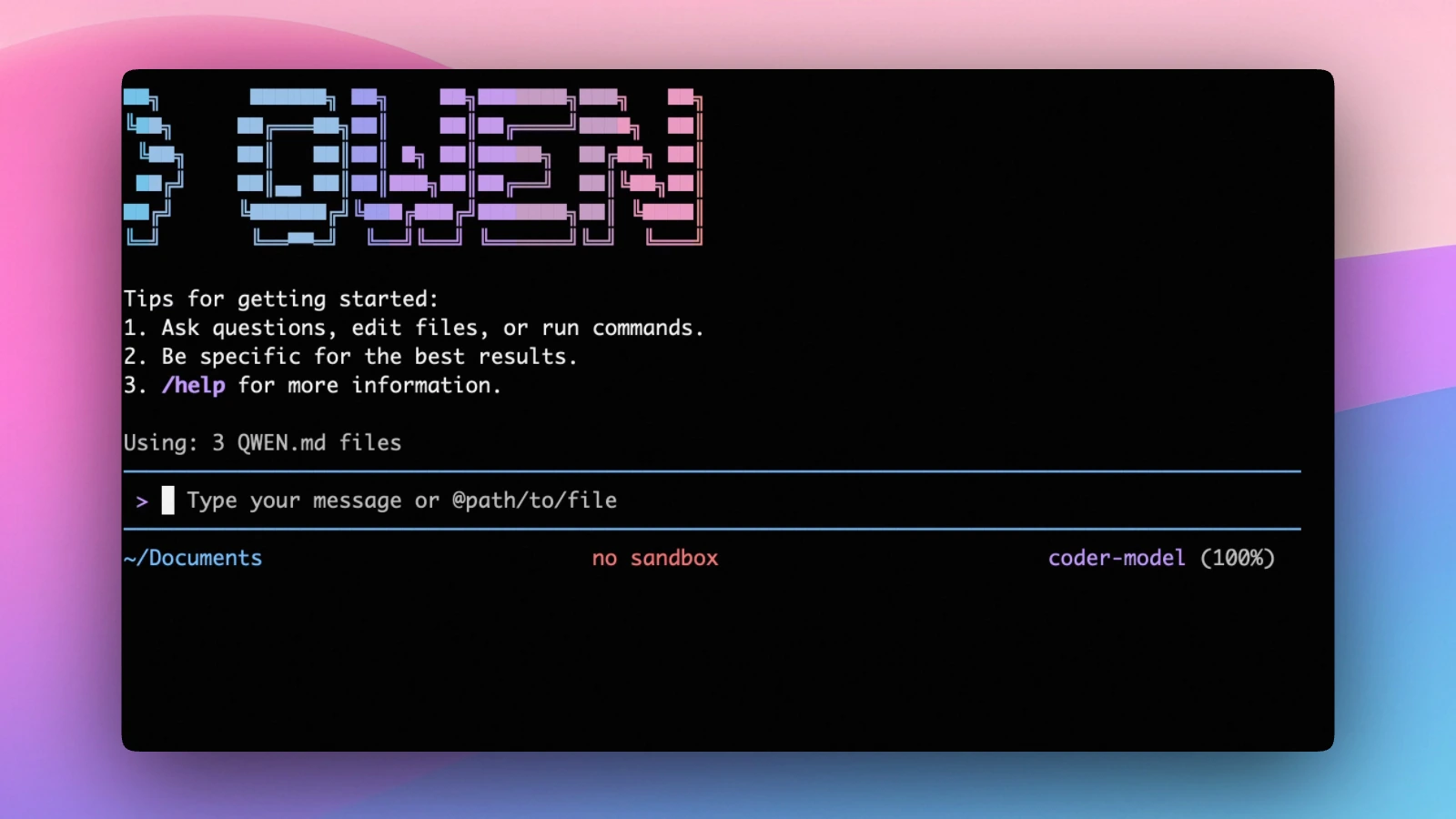
Qwen Code is no longer just a side note attached to the Qwen3-Coder model release. It has become a standalone open-source coding agent with a qwen CLI, provider-flexible authentication, IDE integrations, SDKs, desktop and daemon paths, and a fast-moving GitHub repo.
That distinction matters for searchers. If you type "Qwen Code", "Qwen Code CLI", "Qwen Code GitHub", or "Qwen Code VS Code", you are probably not only asking whether Qwen has a coding model. You are asking whether Qwen Code is a credible agent workflow to install next to Claude Code, OpenAI Codex, Gemini CLI, Aider, OpenCode, or a VS Code-native assistant.
Short answer: Qwen Code is worth evaluating if you want an open-source, Qwen-optimized terminal agent with real provider flexibility. It is less compelling if you want a mature managed team product, a fully model-neutral agent, or a polished IDE-first workflow with minimal setup.
Quick Verdict
| Question | Qwen Code answer |
|---|---|
| Best for | Terminal-first developers who want an open-source Qwen-friendly coding agent |
| Not ideal for | Teams that want a fully managed vendor product with centralized admin controls |
| Primary interface | qwen CLI, with headless mode, VS Code Companion, JetBrains/Zed paths, SDKs, desktop, and daemon options |
| Pricing | Qwen Code is Apache-2.0 open source; model access, API usage, or Alibaba Cloud Coding Plan costs are separate |
| Strongest fit | Developers comparing Qwen Code with Claude Code, Codex, Gemini CLI, Aider, and OpenCode |
| Main caveat | The old Qwen OAuth free tier is discontinued, so practical use requires a current provider setup |
Keep the tool in view
Open Qwen Code before you forget it
The profile page adds pricing, pros, cons, and internal alternatives without throwing you straight to a vendor pitch.
What Is Qwen Code?
Qwen Code is Qwen's agentic coding tool for working from the terminal. The official docs describe an install path that launches a local qwen command, then prompts users to connect a model provider on first use. From there, it can inspect a project, edit files, run commands, debug issues, automate repetitive work, and handle scripted tasks through headless prompts.
The Qwen Code GitHub repository is also important context. At review time, it showed Apache-2.0 licensing, roughly 25.9K stars, 2.6K forks, and active release work. The README positions Qwen Code as an open-source agent that lives in the terminal, not just a model demo.
The key point: Qwen Code is a tool layer. Qwen3-Coder is a model family. They are related, but they answer different questions.
If your question is "which coding model should I use?", read about Qwen3-Coder. If your question is "which agent should control my repo workflow?", Qwen Code belongs in the same comparison set as Aider, OpenAI Codex, Claude Code, Gemini CLI, and OpenCode.
Install and Setup Reality
The official Qwen Code docs now recommend a standalone installer when available. Linux and macOS users can install through the published shell script, while Windows users get a PowerShell path. The README also documents npm and Homebrew options; npm requires Node.js 22 or later.
The simple install story is only half the setup. The real decision is authentication.
The authentication docs state that the Qwen OAuth free tier was discontinued on April 15, 2026. That means new users should not plan around old "free OAuth" claims they find in older posts or videos. Current practical paths include Alibaba Cloud Coding Plan, a standard API key, third-party providers, custom OpenAI-compatible endpoints, or other supported providers.
That is not a dealbreaker. It is normal for serious coding agents to require model access. But it changes the pricing conversation: Qwen Code may be free software, while the models you run through it are not automatically free.
CLI, Headless Mode, and Automation
Qwen Code's clearest advantage is still the terminal workflow.
In interactive mode, qwen gives developers a local agent loop for asking about a repository, planning changes, editing files, running commands, and iterating inside the project. That is the right shape for developers who already trust terminal tools more than hosted IDE surfaces.
Headless mode is equally important. The official docs and README show qwen -p as the scripted path for non-interactive work. That makes Qwen Code relevant for automation, CI-style analysis, release-note generation, log inspection, translation tasks, and other workflows where opening a chat UI would be the wrong interface.
This is where Qwen Code has a stronger story than many Qwen model wrappers. A model endpoint can answer prompts. A coding agent has to manage files, commands, approvals, context, and repeatable execution. Qwen Code is trying to be the second thing.
VS Code Companion and IDE Integrations
Searches that mention "Qwen Code VS Code" are not comparison pages in disguise. They usually mean installation, extension, or official integration intent.
The Qwen Code Companion Marketplace listing describes a VS Code extension that gives Qwen Code a sidebar interface, native diff review, auto-accept edits mode, file attachment, conversation history, and multiple sessions. At review time, the listing was marked Free and showed more than 294K installs.
The official VS Code integration docs call the extension beta, which is the right caveat. If you want the most direct Qwen Code experience, start with the terminal. If you want IDE-native review and chat inside VS Code, the Companion extension is now a real part of the product surface, not a third-party afterthought.
Qwen Code also documents JetBrains and Zed integration paths, plus SDKs for building on top of the agent. That breadth is promising, but it also makes product evaluation more complicated. A team should test the exact surface it plans to use instead of assuming the CLI, VS Code extension, desktop app, daemon mode, and SDKs all feel equally mature.
Pricing Reality
Qwen Code's pricing is best understood in three layers.
First, the codebase is open source under Apache-2.0. You can inspect it, contribute to it, and use the framework without buying a normal SaaS seat.
Second, model access is separate. The current auth docs point users toward Alibaba Cloud Coding Plan, API keys, third-party providers, custom providers, and other supported routes. Your real monthly cost depends on which provider and model you choose, how often you run the agent, and whether your workflow burns tokens through long sessions.
Third, the VS Code Companion extension is listed as Free in the Marketplace, but that does not make the underlying model usage free. Treat "free extension" and "free inference" as separate claims.
That distinction is the most common pricing trap. Qwen Code can be a low-cost or flexible setup if you already manage model access well. It can also become confusing if you expected one bundled subscription and a polished admin console.
Compare before you switch
Pressure-test Qwen Code
Use the alternatives block on the tool page before you leave for the official site. That one extra step usually saves you a bad pick.
Qwen Code vs Alternatives
Qwen Code vs Claude Code: Claude Code is the stronger default if you want Anthropic's managed workflow and do not care about open-source framework control. Qwen Code is more attractive if you want an inspectable tool layer, Qwen optimization, and provider flexibility.
Qwen Code vs OpenAI Codex: Codex is a better fit for teams already standardized on OpenAI's coding-agent surface. Qwen Code is more interesting for developers who want to compare Qwen-family models, OpenAI-compatible endpoints, and local or third-party providers through one open tool.
Qwen Code vs Gemini CLI: Qwen Code started from Gemini CLI work, but the current README says it has moved into independent development as a multi-protocol, multi-platform agent framework. If you are choosing between them, compare current behavior rather than assuming they are interchangeable.
Qwen Code vs Aider: Aider remains the mature git-native baseline for terminal AI coding. Qwen Code feels broader and more agent-platform oriented, with IDE, SDK, daemon, and provider ambitions. Choose Aider if you want the established local git editing loop. Test Qwen Code if Qwen models or a newer agent framework are the point.
Qwen Code vs OpenCode: OpenCode is another strong open-source agent surface. Qwen Code's edge is Qwen ecosystem alignment and fast expansion across interfaces. OpenCode may feel more model-neutral depending on your setup.
Who Should Use Qwen Code?
Use Qwen Code if you:
- Prefer terminal-first development but still want optional VS Code or IDE paths
- Want a Qwen-optimized coding agent instead of only a Qwen model endpoint
- Need headless prompts for scripts, CI, or repeatable automation
- Care about open-source framework control and Apache-2.0 licensing
- Want to compare Alibaba Cloud, OpenAI-compatible, third-party, or local providers
Avoid Qwen Code if you:
- Want a fully managed team product with centralized controls
- Do not want to think about provider setup, API keys, or model costs
- Need a battle-tested workflow with years of production behavior behind it
- Prefer a purely IDE-first coding assistant
- Are not specifically interested in Qwen models or open agent tooling
Final Verdict
Qwen Code deserves a standalone review because it is now more than "the CLI for Qwen3-Coder." It is an open-source agent framework with terminal, headless, IDE, SDK, desktop, and daemon ambitions. The GitHub traction, official docs, provider flexibility, and VS Code Companion install base make it credible enough to evaluate seriously.
The tradeoff is maturity and setup. You should not install Qwen Code expecting the same managed experience as a closed coding assistant. You should install it because you want control, Qwen ecosystem alignment, and a rapidly evolving open-source agent you can inspect.
For a shorter directory summary, open the Qwen Code profile. For source-level verification, start with the official Qwen Code docs, Qwen Code GitHub repository, authentication guide, and Qwen Code Companion Marketplace listing.