CC-Connect Review 2026: Remote Chat Control for Claude Code, Codex, Gemini CLI, and More
TL;DR
Use this article to move into a better next click
- A practical CC-Connect review covering chat-platform control, supported coding agents, install paths, pricing reality, security tradeoffs, GitHub signal, and alternatives.
- CC-Connect is most relevant for CLI Tools + Agentic Coding, and the directory profile adds pricing, tradeoffs, and alternatives.
- Before you commit, compare it with VibeTunnel and Agent Deck.
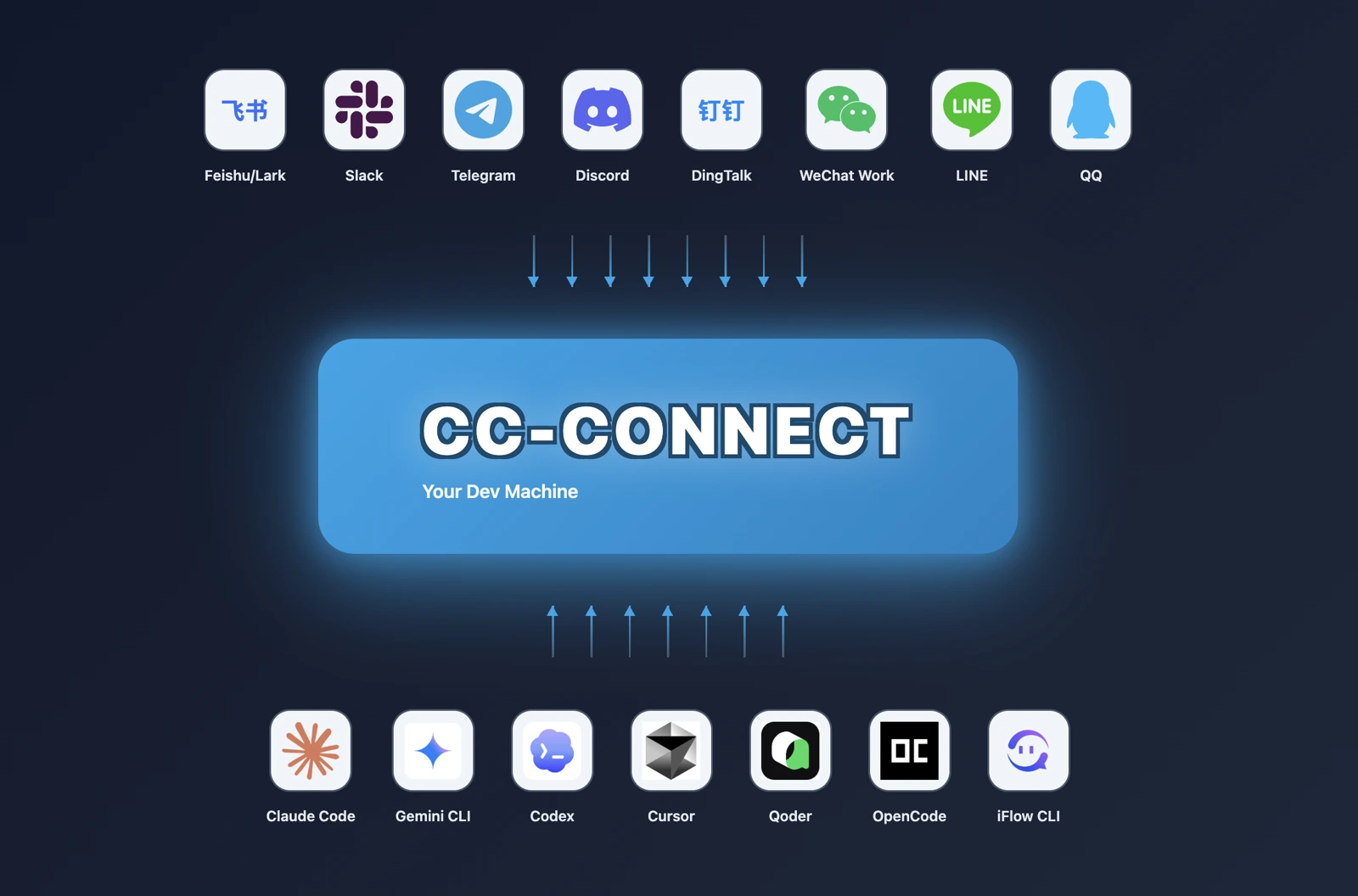
CC-Connect is not another coding agent. It is a bridge between the coding agents you already run locally and the chat platforms you already check constantly.
That distinction matters for search intent. If you search for "cc-connect", "cc-connect GitHub", "cc-connect Claude Code", or "cc connect Codex", you are probably not asking whether a model can write code. You are asking whether it is safe and useful to control local agents such as Claude Code, OpenAI Codex, Cursor Agent, Gemini CLI, OpenCode, Qoder CLI, Kimi CLI, Pi, Devin CLI, and GitHub Copilot CLI from Slack, Telegram, Discord, Feishu, DingTalk, WeChat Work, LINE, QQ, Matrix, or another messaging surface.
Short answer: CC-Connect is worth evaluating if you already trust local coding agents and want lightweight remote supervision from chat. It is a bad default if your team has not thought through permissions, secrets, work directory boundaries, group-chat exposure, and who is allowed to issue commands.
Quick Verdict
| Question | CC-Connect answer |
|---|---|
| Best for | Developers who want to supervise local coding agents from chat apps |
| Not ideal for | Teams without clear permission, secret, and workspace controls |
| Primary interface | Local cc-connect service plus chat platforms and optional web admin |
| Pricing | Free MIT open-source software; agent, model, and chat-platform costs are separate |
| Current status checked | GitHub showed about 13.8k stars, 1.3k forks, fresh July 2026 activity, and v1.4.1 released June 28, 2026 |
| Strongest fit | Remote agent control, session management, chat-native commands, and scheduled agent tasks |
| Main caveat | A chat bridge can expose powerful local tools if admin rules and tokens are loose |
What Is CC-Connect?
CC-Connect is an open-source bridge that connects locally running AI coding agents to messaging platforms. The official GitHub README describes the core idea clearly: control local AI agents from any chat app, across devices, without requiring a public IP for most supported platforms.
The important product shape is "agent delivery layer." Claude Code, Codex, Gemini CLI, Cursor Agent, OpenCode, Qoder, Kimi, Pi, Devin, Copilot CLI, and ACP-compatible agents remain the execution engines. CC-Connect gives those engines a chat-facing control surface.
That puts CC-Connect in a different comparison set from pure agent CLIs. You should not compare it only with Claude Code, OpenAI Codex, Gemini CLI, or Qoder as if it replaces them. A better question is whether you need a remote operator layer around those tools.
Keep the tool in view
Open CC-Connect before you forget it
The profile page adds pricing, pros, cons, and internal alternatives without throwing you straight to a vendor pitch.
Current GitHub and Release Signal
As of July 10, 2026, the CC-Connect GitHub repository showed roughly 13.8k stars, 1.3k forks, an active non-archived repository, and recent July 2026 activity. The latest GitHub release was v1.4.1, published on June 28, 2026.
The npm package also listed version 1.4.1 with MIT licensing. That matters because CC-Connect is not just a README concept: the project documents npm, Homebrew, release binary, and source-build install paths.
Public signal is strong enough to justify evaluation. It is not enough to justify careless deployment. A tool that can forward chat commands into local coding agents deserves more review than a normal CLI helper because the blast radius includes your filesystem, terminal commands, model credentials, and repository access.
Supported Agents and Chat Platforms
CC-Connect's main advantage is breadth.
The README lists first-class support for agents including Claude Code, Codex, Cursor Agent, Gemini CLI, Qoder CLI, OpenCode, iFlow CLI, Kimi CLI, Pi, Devin, Copilot, and any agent that supports Agent Client Protocol. That makes it useful if you are not loyal to one agent or if your team is already comparing several harnesses.
The platform list is also broad. Current docs describe support for Feishu/Lark, WPS Xiezuo, DingTalk, Telegram, Slack, Discord, WeChat Work, Weixin personal mode, LINE, Weibo, QQ, QQ Bot, and Matrix, with different connection modes. Many use WebSocket, long polling, gateway, or socket-style paths that avoid a public URL, while webhook-style setups may still require one.
Do not read "supported" as "zero setup." Each platform has its own bot permissions, message format limits, media behavior, rate limits, and admin controls. The best fit is a developer who is comfortable reading platform setup docs, not someone expecting a consumer chat app login.
What You Can Control From Chat
CC-Connect is more than a message relay.
The current README documents session management, directory switching, slash commands, model switching, permission mode changes, persistent memory editing, scheduled tasks, file and image handling on supported platforms, and a web admin UI for configuration. It also describes multi-project architecture, where one process can manage multiple projects with different agent and platform combinations.
That combination is useful in real workflows:
- Start or resume an agent session from a phone while away from the desk.
- Ask a local agent to inspect a repository and report back into Slack or Telegram.
- Route different projects to different bots or chat channels.
- Schedule a recurring agent task such as a daily summary or repository check.
- Use chat as a lightweight supervisory layer over terminal agents.
The value is convenience plus continuity. The risk is that convenience can make serious commands feel casual.
Install and Setup Reality
The simplest documented install path is npm:
npm install -g cc-connect
The README also documents Homebrew, release binaries, and building from source with Go. After installation, users can run cc-connect web to configure the web admin and create projects, platforms, and providers visually. Running the web admin is configuration; running the service itself is a separate step.
Manual setup uses a config file under ~/.cc-connect/config.toml. That is where deployment quality starts to matter. The docs call out project-level admin controls such as admin_from, user ID discovery with commands like /whoami or /status, and bridge token behavior.
If you are evaluating CC-Connect for a team, do not stop after "it can reply in Telegram." Test the exact platform, exact agent, exact working directory, and exact permission mode you plan to use.
Security and Permission Tradeoffs
This is the most important section.
CC-Connect can make coding agents feel available from anywhere. That is exactly why it needs discipline. A local coding agent may be able to read files, edit code, run tests, execute shell commands, access model credentials, and open network connections. Putting chat in front of that agent changes the trust boundary.
Before using CC-Connect on a serious machine, answer these questions:
- Which chat users are allowed to issue privileged commands?
- Can group-channel messages accidentally reach an agent?
- Is the bridge protected by a token when needed?
- Which directories can each project access?
- Does the agent run under a constrained OS user where possible?
- Are secrets,
.envfiles, SSH keys, and production credentials out of reach? - What happens if a long-running command hangs?
- Can you audit who sent which command?
The project is aware of some of these concerns. The README discusses admin users, token behavior, long-running turn hardening, and OS-user isolation support for some setups. That is good. It does not remove the need for a local security model.
The blunt version: if your current agent workflow already has sloppy permissions, CC-Connect will make that sloppiness easier to trigger from more places.
Compare before you switch
Pressure-test CC-Connect
Use the alternatives block on the tool page before you leave for the official site. That one extra step usually saves you a bad pick.
Pricing Reality
CC-Connect itself is free open-source software, and npm reports MIT licensing. That does not mean the complete workflow is free.
Your actual cost depends on the agent and model you connect. Claude Code, OpenAI Codex, Gemini CLI, Cursor, Qoder, Kimi, Devin, Copilot, and other upstream tools each have their own access model, subscription, API key, or provider cost. Chat platforms can also introduce paid workspace features, bot limits, or enterprise controls.
So the pricing answer is simple but easy to misread: CC-Connect is the bridge. The agents, models, and chat workspaces are separate.
CC-Connect vs Alternatives
CC-Connect vs using Claude Code or Codex directly: Use the agent directly when you are at the machine and want the cleanest local loop. Add CC-Connect when remote supervision from chat is the actual problem.
CC-Connect vs VS Code or Cursor remote access: A remote editor gives richer context and direct file control. CC-Connect is lighter: chat commands, replies, sessions, and agent supervision from devices where opening a full IDE would be clumsy.
CC-Connect vs multi-agent managers like Claude Squad, Agent Deck, or Paseo: Multi-agent managers focus on supervising several agent sessions, often with worktrees, terminal panes, or web dashboards. CC-Connect focuses on exposing local agents through chat platforms. The products can overlap, but the center of gravity is different.
CC-Connect vs writing your own Slack or Telegram bot: Build your own if your workflow is narrow and security requirements are unusual. Use CC-Connect if you want a maintained, multi-agent, multi-platform bridge with docs, release binaries, and existing session controls.
Who Should Use CC-Connect?
Use CC-Connect if you:
- Already use terminal or local coding agents and want chat-native remote control
- Need Slack, Telegram, Discord, Feishu, DingTalk, WeChat Work, or similar platform access
- Want one bridge across multiple agents instead of one custom bot per workflow
- Are comfortable configuring bots, tokens, project directories, and admin users
- Need lightweight scheduled or long-running agent tasks without sitting at the terminal
Avoid CC-Connect if you:
- Have not defined who can command your agents
- Keep production secrets in the same environment as your coding agent
- Need enterprise-grade audit, policy, and device management out of the box
- Want a polished hosted product with support contracts and admin dashboards
- Mostly work at the same machine and do not need chat-based control
Final Verdict
CC-Connect is a credible open-source bridge for developers who want to control local coding agents from chat. The project has real public traction, fresh releases, broad agent support, broad platform support, and enough configuration surface to be more than a toy relay.
Its weakness is also its power. Chat access makes agents easier to use, but it can make dangerous workflows easier to trigger. Treat CC-Connect as infrastructure around your coding agents, not as a harmless notification bot.
For a shorter directory summary, open the CC-Connect profile. For source-level verification, start with the CC-Connect GitHub repository, the latest release, and the npm package.